VISI Mold Design
Automate Your Mold Development Process from Start to Finish
GET MORE INFORMATON & A FREE TRIAL
Built for the Way Mold Shops Work
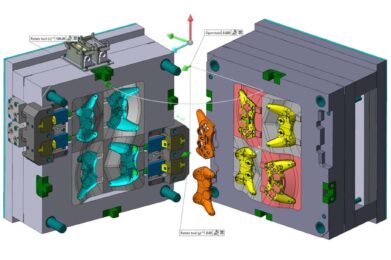
VISI Mold is a purpose-built mold tool design solution that guides your team through the entire development process using industry-specific automation. Real-time operation previews let designers see exactly how component changes impact the tool design as they work — keeping decisions informed and projects moving forward without surprises.
Features at a Glance
- Automatic recognition of design changes
- Draft angle visualization
- Multiple split line calculations
- Core and cavity model separation
- Dynamic 3D tool design
- Customizable supplier catalogs
- Intelligent component editing
- Slides, lifters, and flexible up-and-away units
- 3D cooling design with collision checking
- Associative tool detailing
- Automatic Bill of Materials generation
- Seamless link to manufacturing
CAD and Modeling
Broad CAD Compatibility
VISI connects directly with Parasolid, IGES, CATIA, Creo, UG-NX, STEP, SolidWorks, Solid Edge, Inventor, ACIS, DXF, DWG, JT Open, STL, and VDA files. This extensive translator library means your team can work with customer data from virtually any source. Large files are handled efficiently, and the ability to bypass corrupt records during import keeps even inconsistent data manageable.
True Hybrid Modeling
Work freely across solid, surface, and wireframe geometry — or any combination — without restrictions. Solid modeling handles boolean operations like unite, subtract, extrude, revolve, sweep, cavity, intersect, and hollow. Surface modeling extends those capabilities with ruled, lofted, drive, sweep, n-sided patch, drape, tangent, draft, revolved, and piped surface functions. Together, these tools make it straightforward to repair imported geometry or build highly complex 3D designs from scratch.
Model Validation and Preparation
Before mold design begins, VISI automatically checks the model for feasibility issues, redundant geometry, sliver faces, and topology inconsistencies. Draft analysis renders the model using color-coded zones so undercuts and non-drafted faces are immediately visible. Duplicate geometry is flagged, extracted, and moved to warning layers. Sliver face detection and automatic removal cleans up problematic areas while preserving solid topology — saving significant time later in the project.
Split Line / Parting Plane Creation
Multiple automated routines calculate the optimal split line around the component. A highly graphical interface lets the designer interact with and refine the computer-generated result to meet specific design requirements. The finalized split line can be extracted as curve geometry or used to automatically divide the model into core, cavity, and side-action zones. A comprehensive surfacing toolkit and split plane manager handle even the most complex parting and shut-off face geometry.
Mold Design Tools
Automated Tool Assembly
Quickly build out a mold base layout and all associated components using a parametric structure driven by supplier libraries from Hasco, DME, DMS, Strack, Meusburger, Cabe, Ceni, Danly, FCL, Futaba, LKM, Pedrotti, Rabourdin, Siam, Sideco, Siderurgica, Siscat, TVMP, UMC, VAP, Victoria, and more. Any change to plate dimensions automatically updates all connected standard components. Parts list data is generated automatically and can be exported as a spreadsheet for detailing and procurement.
Undercut Release Features
Side actions, lifters, and flexible up-and-away units are all supported through dedicated undercut release tools. A proprietary parametric component library lets the designer build around undercut features and instantly preview how each mechanism affects the overall tool design.
Intelligent Components
Standard components from over 35 suppliers behave intelligently within the assembly. Screw lengths and other hardware automatically adjust based on plate thickness and rule-driven parameters. Ejector pins are trimmed automatically to match the 3D cavity form, and multiple locking methods are available to prevent pin rotation.
Cooling System Design
Sketch the cooling channel path and let the dedicated cooling wizard handle the rest — giving you full control over position and sizing while running automatic proximity checks to prevent interference with other tooling elements. Standard fittings from supplier libraries drop in easily, and complete cooling circuits can be saved as reusable templates. If the bolster dimensions change, the cooling layout adapts automatically to fit the new plate sizes.
Manufacturing and Tooling
Tool Detailing
Generate a complete set of 2D detailed drawings directly from the solid tool assembly. Fully editable 2D and isometric section views, automatic plate dimensioning, and hole type and position tables are all included. Any component in the assembly can be detailed individually and displayed as a combination of 3D rendered and 2D views. When the solid model changes, associated 2D views and dimensions update automatically. Parts list items and balloon references are managed through dedicated assembly tools.
Manufacturing Modules
VISI's integrated environment means individual plates can be taken directly into manufacturing using feature recognition — drilled hole features and apertures are automatically selected and assigned the correct drilling cycles and 2D milling routines. For complex core and cavity work, VISI Machining generates 3D through 5-axis conventional and HSM cutting toolpaths. Keeping the entire project within one product environment, from initial design through final machining, ensures data consistency and a smoother overall workflow.