
VISI Analysis
Catch Geometry Problems Early — Before They Become Costly Delays
GET MORE INFORMATON & A FREE TRIAL
Start Strong on Every Project
When building molds and dies from imported data, geometry quality can make or break your timeline. VISI Analysis gives mold and die designers the tools to identify and resolve model issues at the very start of a project — before problems compound downstream. From draft checking to core/cavity separation, you'll move into design with confidence and keep your project on schedule.
Capabilities at a Glance
- Automatic detection of design changes between model versions
- Draft angle visualization with user-defined color zones
- Model curvature and min/max radii display
- Thickness analysis with gating and rib criteria mapping
- Dynamic face analysis and seed face propagation
- Core and cavity model separation tools
- Multiple split line calculation methods
- Dynamic parting face generation
- Geometry validation and model cleaning
- Redundant data and sliver face detection
- Surface edge tolerance control
- Animated mold opening sequence simulation
Model Analysis
Design Change Detection
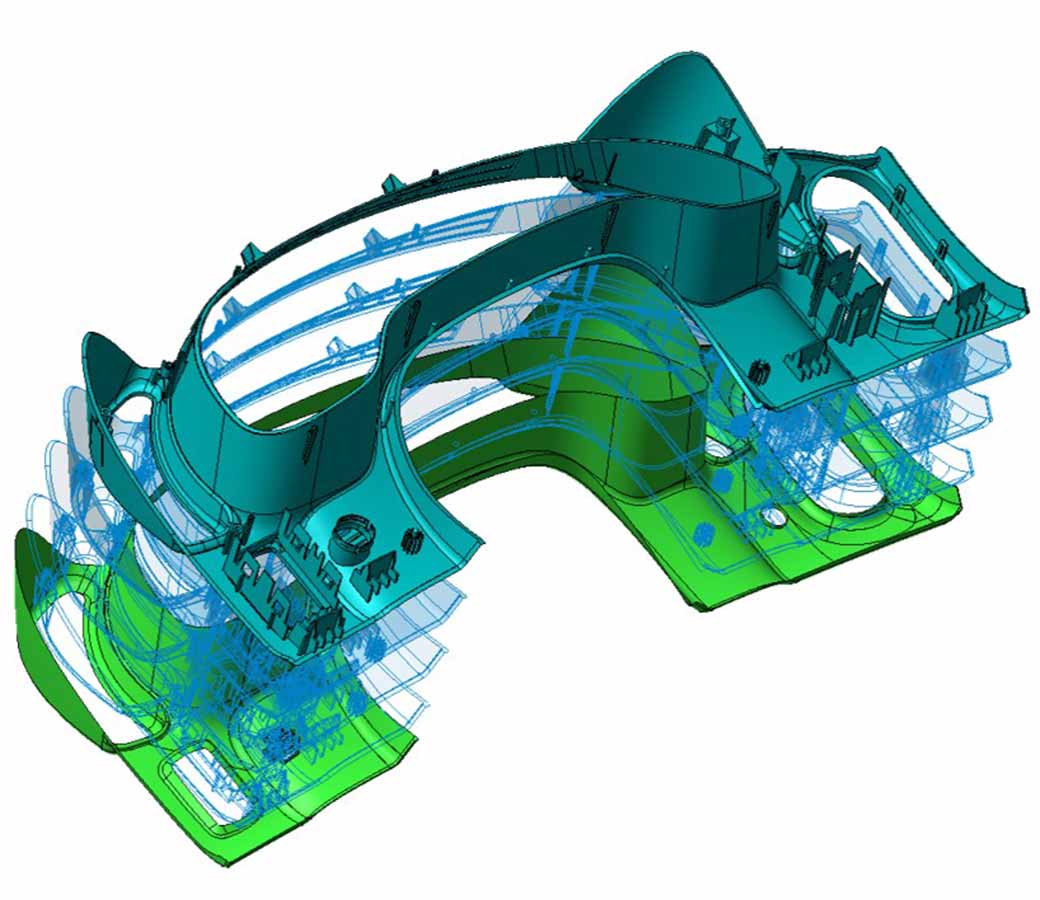
Load two versions of a model — solid or surface — and instantly identify what's changed. Deviations are highlighted visually using color overlays and transparency controls, making it fast and easy to locate modifications and apply them to your working data.
Draft Angle & Radii Checking
Validate mold feasibility before committing to design. Select the mold direction and VISI renders the model using color-coded draft zones so problem areas are immediately visible. Curvature and radii extremes are also surfaced through the same graphical interface.
Thickness Analysis
Visualize wall thickness across the entire model to inform gating positions, rib design, and cooling channel layout. Edge conditions are also interrogated and simplified, helping ensure imported data doesn't introduce topology issues that compromise your results.
Seed Faces
Select one or more starting faces and automatically propagate selection across connected surfaces based on a user-defined angle threshold. Ideal for quickly isolating water jackets or separating geometry into A and B surface groups.
Surface Analyser
Hover over any area of the model to instantly pull up face data — draft conditions, trimming loops, fillet radii — without running a separate analysis. The fastest way to do a quick spot-check on any model surface.
Model Prep
Core & Cavity Separation
Comprehensive interrogation tools gather the surfaces needed to define core, cavity, undercut, and side-action zones. Undercuts can be animated along movement axes to simulate the full mold opening sequence — exportable as XML for documentation and client review. Three split line routines help you find the optimal parting line, with full manual override capability.
Parting & Shut-Off Faces
Generating accurate parting and shut-off geometry is one of the most demanding tasks in mold design. VISI Analysis combines a full surfacing toolkit with a split plane manager to handle even the most complex conditions. Externally created surfaces can be imported directly and combined with extruded, offset, ruled, and patch surfaces to complete the parting geometry.
Model Validation & Cleaning
Run automated checks for duplicate geometry, sliver faces, and topology errors. Flagged data is highlighted and can be extracted or moved to a separate layer. Automatic removal, healing, and sewing tools restore solid topology and ensure data integrity before design work begins.
Tip Data
Working with car-line geometry or data from multiple coordinate origins? Tip data tools simplify the process of aligning and transferring 3D model information to your working origin, with full movement reporting available for project documentation.