
VISI 3 Axis Toolpath
Intelligent 3D Toolpaths with High Speed Milling Routines
GET MORE INFORMATON & A FREE TRIAL
Tackle the Most Complex 3D Parts
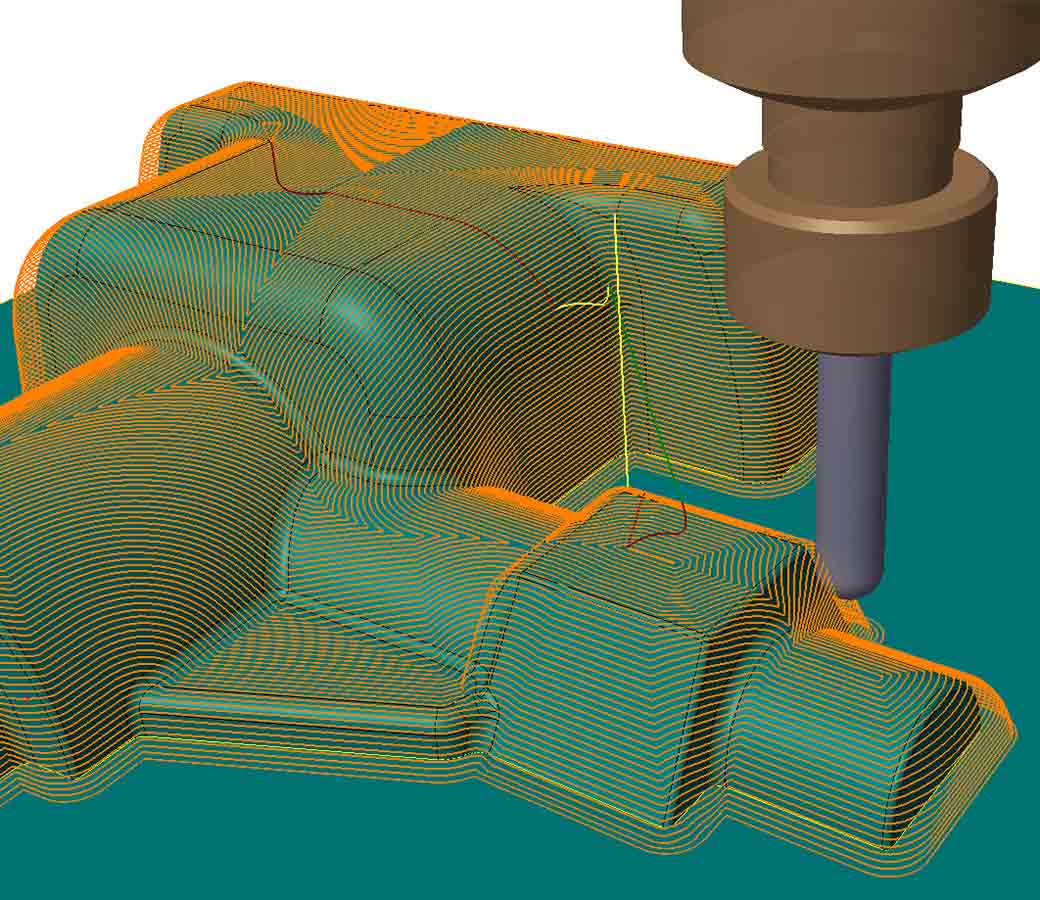
VISI Machining 3D generates intelligent toolpaths for the most demanding 3D parts. Dedicated high speed milling techniques combined with built-in smoothing algorithms produce highly efficient NC code that reduces cycle times, improves productivity, and delivers consistent, high-quality results on the machine.
Features at a Glance
- Extensive CAD interfaces
- Comprehensive tool library
- Adaptive roughing technology
- Operation rest roughing
- Combined finishing strategies
- Steep and shallow corner rest milling
- Full tool and holder gouge protection
- High speed optimized toolpath movements
- Full kinematic simulation
- Customizable post processors
- Reliable and efficient NC code
- Multi-threading processor support
CAD Interfaces
Extensive CAD Interfaces and Powerful Modeling
VISI works directly with Parasolid, IGES, CATIA, Creo, UG-NX, STEP, SolidWorks, Solid Edge, Inventor, ACIS, DXF, DWG, JT Open, STL, and VDA files. The broad translator library ensures your team can work with data from virtually any supplier, and complex customer CAD data can be handled efficiently without manual conversion. VISI works directly with wireframe, solid, surface, and mesh data — or any combination of the four — giving programmers the flexibility to work from any CAD model or quickly remodel parts for machining using the full power of true hybrid surface and solid modeling.
Tooling
Comprehensive Tool Library with Holders, Cutting Parameters, and Sister Tooling
Tool catalogs, holders, extensions, adapters, storing speeds, feeds, optimal cutting depth, stepover values, tool offsets, and tool and gauge lengths can all be selected from user-definable libraries. For longer machining cycles, VISI tracks the amount of machining completed and automatically calls for a sister tool when the specified tool life has been reached — minimizing the risk of part damage from worn or broken tooling.
Tapered Tools Supported on All Cycles
When a model has no draft, tapered tools can be used to machine the draft angle directly onto the part — eliminating the need to modify the model geometry before machining begins. Adding draft to imported geometry manually can be a time-consuming and difficult task, and tapered tool support removes that requirement entirely.
Tool Holder Collision Checking
Checking both the tool and holder against the model provides an early warning of potential collisions, along with information about the tool length required to complete the job. By limiting the Z cutting envelope for each tool, it becomes possible to use multiple tools to machine a single cavity — taking advantage of the increased rigidity of shorter tools to remove the majority of material efficiently.
Machining
Intuitive Interface
A clean tree structure makes it easy to navigate machining operations. Depth of cut, stepover, ramp angle, and other parameters are entered through a highly graphical interface, and the most commonly used values can be saved as defaults to speed up setup. On-screen context-sensitive help guides the programmer through the available machining options at every step.
Multiple Roughing Toolpaths
A combination of constant Z roughing, adaptive roughing, core roughing, and rest roughing — combined with intelligent ramp, helical, and planar entry methods — gives the programmer the flexibility to produce efficient NC code for any component. Smooth corner radii and smooth transitions between passes keep the tool at maximum feed rate and prevent it from dwelling in corners. For subsequent roughing operations, VISI remembers where remaining stock exists and only machines those areas — eliminating wasted air cutting and unnecessary rapid movements. When the starting billet is pre-machined or a casting, VISI recognizes and machines only where material is present, keeping cycle times to a minimum.
Adaptive Clearance
Adaptive clearance toolpaths rough the part from bottom to top by taking large steps using the full flute length of the tool with a small stepover, then machining back up through the intermediate levels. The process repeats until the component is fully machined. The tool stays on the part as continuously as possible, and the toolpath automatically switches to a trochoidal motion when the part shape requires it — ensuring there are never any full-width cuts and maintaining a constant tool load. Tool wear is distributed evenly across the cutting surfaces, with the center of force held at the midpoint of the tool to reduce deflection. When combined with adaptive roughing, the cycle automatically adjusts the toolpath for efficient, safe cutting — enabling higher machining speeds and saving up to 40% in actual cutting time.
ISO-Machining
ISO-Machining is based on single or multiple surfaces and machines the surface directly rather than creating a triangulated mesh. This strategy is ideal for machining groups of surfaces that form radii, using the contact point of the tool as it machines to the full edge of the geometry. It is also highly effective for targeting small areas without having to machine the entire component. All toolpaths are fully gouge protected against neighboring surfaces, with multiple collision detection options available.
Flat Surface Machining of Planar Surfaces
For areas of the part that are flat, VISI automatically detects those regions and machines them with a flat-bottomed tool. Machining time for flat areas is significantly reduced and surface finish is greatly improved compared to using a ball-nose tool.
3D Stepover Finishing
The 3D stepover toolpath delivers a consistent surface finish regardless of component shape. By morphing the toolpath across the surface, one toolpath finishes the entire job — keeping the tool on the surface, minimizing retracts, and eliminating duplicate cutter paths. The stepover smoothly adapts to the shape of the part, minimizing shock loading on the tool and allowing the machine to run at the optimum feed rate.
True Spiral and Radial Finish Machining
Both spiral and radial toolpaths are excellent finishing strategies for circular components, as they are defined by inner and outer circular limits. The spiral toolpath has a single start and end point, keeping the tool on the component continuously and eliminating redundant moves or sharp direction changes. This allows the machine to run at very high feed rates by removing acceleration and deceleration caused by sudden changes in direction. The radial toolpath supports upward-only, downward-only, or zigzag machining parameters for complete control over the cutting strategy.
Parallel Plane Finishing
Unidirectional and zigzag toolpaths can be set at any angle. Angle limits can be applied to steep and shallow areas separately, eliminating the need for complex geometry boundaries. Optimized cross-machining can be applied to steep areas within a single toolpath, automatically generating additional toolpaths at 90 degrees to the original passes — machining only the areas needed to produce a consistent surface finish across the entire component. Roughing mode within the parallel plane toolpath allows the part to be roughed and finished in one operation. Smooth stepovers and tangential extensions improve surface finish and reduce vibration in the NC file on the machine.
Constant Z and Combined Finishing
For components with steep walls, cutting in Z slices provides an excellent surface finish. VISI offers extensive control over the constant Z strategy, including the ability to automatically adapt slice heights based on wall angle for shallow areas. Wireframe geometry can be used to control slice height and angle limits to eliminate passes in shallow regions. A helical option creates one continuous toolpath that removes witness lines and improves surface finish. A combined constant Z toolpath is also available that handles steep areas using a constant Z method and shallow areas using a 3D constant stepover — operating as a single, comprehensive finishing strategy.
Leading Curve Machining and 3D Curve Machining
Leading curve machining gives the programmer direct control over the cutting area by driving between two curves across the model. Parallel machining morphs between the curve geometry using the curve shape as a toolpath guide, while perpendicular machining runs normal to the guide curves — providing a choice of cutting directions and greater control over the machining method. 3D curve machining forces the cutter to follow the 3D curve in open space without referencing model geometry, making it ideal for scribe lines and engraving.
Rest Machining of Fine Details
Small features on a model typically require rest machining with a smaller tool to fully finish the detail. The rest machining function reliably detects areas left by previous tools so they can be re-machined. For very fine details, the process can be repeated as many times as needed to reach into areas requiring very small cutters. The toolpath can work from the outside inward or from the center outward to handle small blends. For features that are closely spaced, the toolpath morphs and blends around obstacles to create smooth, flowing motion without sudden direction changes — minimizing retracts, reducing shock loading on the tool, and keeping feed rates as high as possible.
Short Calculation Times and Batch Processing
New algorithms deliver fast calculation times even on the most complex parts. High speed machine tools require large volumes of data to run efficiently, and keeping calculation times short minimizes unscheduled stoppages. To maximize software utilization, VISI uses multi-threading to calculate multiple operations simultaneously, with batch processing allowing jobs to be queued for unattended calculation outside of normal working hours. Individual operations can also be post processed separately, allowing roughing programs to be sent to the machine while finishing operations are still being calculated.
Graphical Toolpath Editing and Reordering
Once a toolpath has been calculated, sections can be trimmed and rapid movements edited to optimize the cutting method for individual components. The sequence of operations can be changed using a simple drag-and-drop interface to reorder as needed. Toolpath editing gives programmers the freedom to quickly arrive at their preferred machining method and operation order.
Smooth Point Distribution and Smooth Transitions
VISI generates each toolpath with an even distribution of coordinates. Sending smooth, efficient CNC code to the machine control reduces unnecessary acceleration and deceleration, allowing the machine to run as close as possible to the programmed feed rate. All toolpaths include smoothing radii in corners, smooth transitions between passes, and looping movement options that link the end of each pass to the start of the next. These elements help the machine run faster, prevent sudden direction changes, and reduce excessive strain on the tool.
Template Machining
Programming templates containing tooling, operations, feeds, speeds, depth of cut, and other parameters can be stored and reused across similar parts or part families. Applying a template to a new part automatically generates a complete set of toolpaths using the same proven settings — significantly reducing programming time and enforcing company-standard feeds, speeds, methods, and tooling that have already been validated on previous jobs.
High Speed Machining and Hard Metal Machining
Many toolpaths within VISI are tailored for high speed and hard metal cutting. Smooth corners, smooth stepovers, and arc fitting minimize sudden direction changes. The elimination of tool retracts and the maintenance of a constant tool load, combined with optimized NC code, make it straightforward to program high speed machine tools effectively with VISI.
2D Machining and Manufacturing Feature Recognition
Toolmaking components often include areas that require 2D machining. Because of VISI's integrated nature, individual plates can be taken directly into manufacturing using feature recognition. Drilled hole features and apertures are automatically identified and assigned the correct drilling cycles and 2D milling routines, producing practical CNC code for even the most complex plates.
Full Gouge Protection
All 3D toolpaths are gouge-checked against neighboring surfaces to prevent tool collisions. Small smoothing radii are automatically added to internal corners to prevent the tool from dwelling in those areas — a condition that can pull the tool into the part and create an unexpected gouge that standard toolpath verification would not detect.
Simulation and Optimization
Kinematic Simulation
Toolpath verification can be run against the actual machine dimensions and travel limits using kinematic simulation. Cutting tools, holders, jigs, and fixtures are all included in the check. Any gouge detected between the toolpath and the stock, tool, or any other machine component is graphically highlighted. A comprehensive library of tested 3, 4, and 5 axis machines is available, and Hexagon engineers are available to assist with building kinematic models for custom or one-off machines.
Configurable Post Processors and Setup Sheets
An extensive post processor library covers most machine tools, and every post processor is fully configurable to match individual requirements. Canned cycles for drilling and boring, subroutines, and cutter compensation can all be output alongside 3+2 and full 5 axis CNC code for shop floor use. Custom post processors can also be written for complex or unique machine tools. Setup sheets are automatically generated with datum position, tooling, cycle times, and cutting envelope information, and can be tailored to the needs of each user and output as HTML or XLS files.
NC Feed Optimization
Feed rate optimization can be applied to the NC code to automatically slow the feed rate when entering areas with higher stock volumes — allowing the machine to run faster and smoother overall. The system continuously compares the volume of material being removed against the actual mechanical forces applied to the tool. This sophisticated volume comparison produces better toolpaths, extends tool cutting life, and allows the machine to operate safely at the upper end of its performance range.